


Jimmy John's Sandwiches
4.862.98K Reviews
App Specs
- Version
- 7.7.0
- Updated On
- License
- Free
- Downloads
- 5,000,000+
- Developer
- Jimmy John's Sandwiches
- Categories
- Food & Drink
- Platform
- Android, iOS
Screenshots
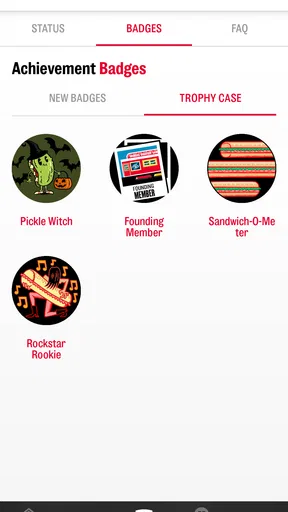
 Analysis by AppCompare
For a lunch order that starts with a familiar sandwich and ends with a pickup or delivery plan, the Jimmy John’s app puts the useful steps in one place. I like that its central job is practical: browse sandwiches, make a few choices, and arrange the meal without turning a quick craving into a long search. The app is free, and it comes from Jimmy John’s Sandwiches, so it is best understood as a direct route to that restaurant rather than a general food-ordering service.
Ordering Around a Familiar Sandwich
The strongest reason I’d use the app is the way it brings ordering, location finding, and order tracking together. That matters most when I already know I want Jimmy John’s and need to decide whether delivery or pickup fits the day. Instead of browsing a broad marketplace with many restaurants, I can focus on the chain’s menu and get to the choices that matter for this particular meal.
From a Regular Order to a More Specific One
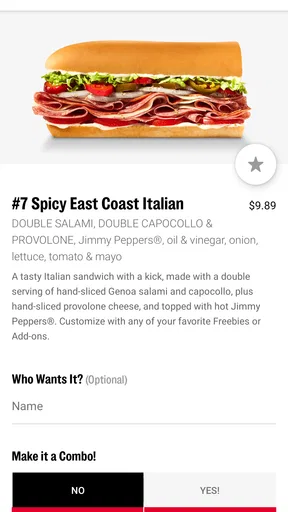
In practice, the ordering flow is especially helpful when I want to repeat a familiar combination or make a small adjustment. If I usually skip an ingredient, for example, making that choice while placing the order is more convenient than trying to remember to explain it later. The original review found that past orders can be remembered, which makes a repeat lunch easier to assemble. I’d still check the sandwich details before confirming, especially when ordering for someone else or changing several ingredients; a saved preference is handy, but it is not a substitute for reviewing what is in the cart.
That small check is a useful habit for group orders, too. I’d build each person’s sandwich deliberately, then pause over the final selections before placing the order. It takes a moment, but it can prevent the common lunch mix-up where a familiar order is accidentally repeated with the wrong modification. For a straightforward solo lunch, the remembered-order convenience is more valuable; for several people with different preferences, careful review matters more than speed.
Choosing Pickup or Delivery for the Day
Finding a nearby store gives the app a role beyond the menu. If I’m away from home, I can use the location option to find a Jimmy John’s and decide whether it makes more sense to collect the food or arrange delivery. That can be useful when a lunch break is short: I can settle the location and order before heading out, rather than arriving hungry and starting from scratch at the counter.
The right choice depends on the day rather than on a universal promise of speed. Pickup can suit someone already passing a store or trying to fit lunch around errands. Delivery makes more sense when staying put is the priority. I would not plan an important meeting around an assumed arrival time; even a quick-order app cannot make every busy period or delivery situation predictable. The useful benefit is being able to place and follow an order, not a guarantee that every meal will arrive on the same schedule.
Tracking Helps After the Order Is Placed
Once an order is underway, tracking gives me a way to check its progress instead of wondering whether I should call or keep watching the door. It is a small feature, but it has a practical effect when I’m working through lunch or coordinating food for other people: I can make a better decision about when to step away from my desk or gather everyone.
Worth Reading Before You Choose

Flipboard Shows What News Apps Must Do Beyond the Feed

Switching to Android Auto Means Rethinking Your Driving Routine

Google Calendar Makes a Crowded Week Easier to Manage

Ludo King Makes the Most of the Minutes Between Plans

Baby Panda World Brings Quick Play to Modern Phones, but Its Game Library Feels Busy

ESPN’s Live Game View Makes Following Close Games Easier
I’d treat tracking as a guide, not a reason to leave food unattended or promise an exact handoff time to a group. For a meal with a flexible schedule, it reduces uncertainty. If the food needs to arrive at a tightly timed moment, I’d leave a buffer and choose the ordering option that best fits the situation. That distinction keeps the feature useful without expecting more precision than a progress screen can offer.
Rewards Are a Reason to Return, Not the Whole Point
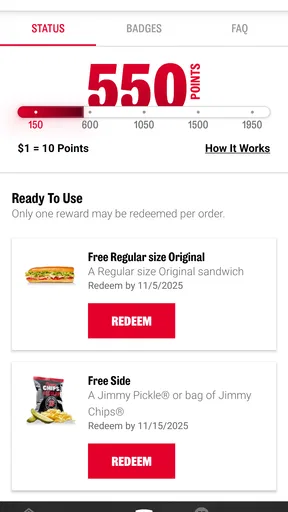
The rewards area can make repeat orders more appealing, and the original review noted points and occasional app offers. I’d think of these as an extra benefit rather than the main reason to choose a sandwich. A deal only helps when I was already considering an order; it is not worth buying more than I want just to chase a reward.
For someone who orders regularly, it makes sense to check the rewards section before checkout so any available benefit does not get overlooked. For an occasional customer, the straightforward ordering tools may matter much more than building up points. That is a useful distinction compared with broad delivery apps, where promotions can dominate the browsing experience: here, the restaurant itself remains the focus, and the rewards are secondary to choosing lunch.
Where This Dedicated App Fits Among Food Options
Compared with a general food-delivery app, this one is narrower by design. That is an advantage when I’ve already decided on Jimmy John’s: there is less unrelated restaurant browsing between me and my order, and the store finder and repeat-order convenience are specific to the chain. The trade-off is just as clear. If I’m still deciding what kind of food I want, or comparing several nearby restaurants, a marketplace app is a better starting point.
Ordering directly can also make more sense when I want the restaurant’s own ordering and rewards experience. On the other hand, if I need to coordinate food from multiple places in one checkout, a broader service may be more convenient. I would choose based on the actual task: this app for a Jimmy John’s meal, a multi-restaurant service for a mixed group order, and a visit in person when I want to decide after seeing the menu or talking through a request.
A Realistic Lunch Routine
Picture a workday when I have a short break and know what sandwich I want. Before the break starts, I open the app, select the familiar order, check any ingredient changes, and choose the store and fulfillment option that fit where I’ll be. If I’m staying at the office, I can follow the order’s progress and use that information to time my break. If I’m heading past a location, pickup may fit better. The benefit is not that the app makes lunch effortless in every circumstance; it is that it moves decisions I can make in advance out of the busiest part of the day.
For a family or office order, I’d use a slightly different workflow: collect each person’s choices first, enter the orders one at a time, and review the whole cart before sending it. That is less dependent on remembered favorites and more dependent on a careful final check. The app is strongest when it helps me make a clear order; it cannot decide everyone’s preferences for me.
Who Will Get the Most from It
I’d recommend it to people who already enjoy Jimmy John’s and expect to order from the chain more than once. Past-order convenience, nearby-store lookup, delivery or pickup choices, and order tracking all make sense together for that audience. The app also suits someone who wants a focused ordering route rather than a screen full of restaurants they are not considering.
It is less compelling if I rarely eat at Jimmy John’s, prefer to compare a wide range of restaurants before deciding, or need a single order that combines several cuisines. Someone who prefers face-to-face ordering may also be perfectly happy skipping the app. The choice is not about whether digital ordering is always better; it is whether these chain-specific shortcuts match the way you actually get lunch.
Practical Details and a Balanced Take
The app is listed as a Food & Drink app, has a 4.8 average from around 282,000 ratings, and has passed 5 million installs. Those figures suggest that many customers find a reason to keep using it, though they do not tell me whether it will suit an occasional visitor or someone whose nearest location is inconvenient. It is free and rated for Everyone, so the main decision is less about the download and more about whether Jimmy John’s fits your eating habits.
The version covered here is 7.5.0, and the listed minimum operating system is 9. I’d check that my device meets the requirement before trying to install it. The app’s straightforward focus is a strength, but it also means it cannot replace broader restaurant discovery. And while a previous order can save time, I would still verify modifications and the selected location every time; those are the details most likely to matter when lunch is rushed.
My overall view is that the app earns its place when the restaurant is already the plan. It brings the useful parts of ordering together without asking me to sift through unrelated choices, and tracking helps make the wait easier to manage. Its limits are mostly a matter of scope and circumstance: it is not a restaurant comparison tool, and an order’s timing still depends on the situation. If a Jimmy John’s sandwich is what you want, it is a sensible way to get from decision to meal.
First Impressions
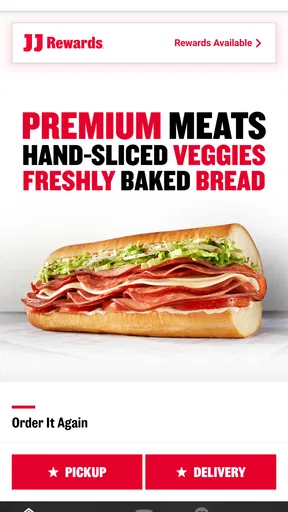
So, right off the bat, I downloaded the Jimmy John's Sandwiches app, and the setup was pretty much a breeze. It’s available for both Android and iOS, so no need to worry about compatibility. The interface is clean, straightforward, and gets you right to the good stuff without any fuss. I mean, who has time to navigate through endless tabs when you’re craving a sandwich, right?
Ordering Made Easy
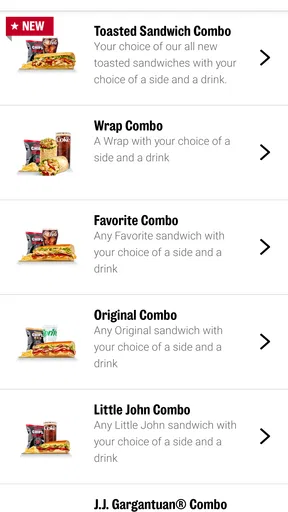
One of the first things that caught my eye was how user-friendly the ordering process is. You can customize your sandwich to your heart’s content. Want extra mayo or hold the onions? No problem at all. The app remembers your past orders too, which is a lifesaver if you’re like me and have a favorite go-to sandwich.
Plus, there’s a neat little feature that lets you find the nearest Jimmy John’s location. Just tap on ‘Find a Store’ and bam, you’re directed to the closest one. This is especially handy if you’re out and about and need a quick lunch fix.
Speedy Delivery
Now, let’s talk about what Jimmy John’s is famous for – their freaky fast delivery. And let me tell you, the app doesn’t disappoint in this department. I placed an order during peak lunch hours, and my sandwich arrived in about 15 minutes. Pretty impressive, right?
They offer a ‘Track Your Order’ feature, so you can keep an eye on your sandwich as it makes its way to you. It’s like watching a mini food journey unfold in real-time. Kind of thrilling if you ask me!
Rewards and Offers
Who doesn’t love a good deal? The app has a rewards section where you can rack up points for every purchase. Accumulate enough points, and you can redeem them for free goodies. There are also exclusive app-only offers that pop up regularly. It’s a great way to get more bang for your buck.
And here’s a pro tip: keep an eye out for seasonal promotions. They often roll out special sandwiches or discounts that you won’t want to miss.
User Experience
Overall, the app runs smoothly and doesn’t crash, which is always a plus. The graphics are simple yet appealing, with mouthwatering images of their subs that make you want to order everything on the menu. One thing I’d love to see is a bit more personalization in terms of themes or color options, but hey, that’s just me being nitpicky.
Final Thoughts
All in all, if you’re a sandwich enthusiast, the Jimmy John's Sandwiches app is worth the download. It’s efficient, easy to use, and gets you your food without any hassle. Whether you're a regular customer or just trying it out for the first time, the app enhances the overall experience of enjoying a quick and delicious meal.
So, if you’re ready to satisfy your sandwich cravings, why not give it a whirl? You might just find yourself coming back for more, just like I did. Bon appétit!
Pros
- User-friendly interface for quick ordering.
- Customizable sandwich options.
- Fast delivery service.
- Multiple payment methods supported.
- Loyalty rewards program available.
Cons
- Limited vegetarian options.
- Occasional app crashes.
- Delivery not available in all areas.
- No nutritional info provided.
- In-app ads can be intrusive.
FAQs for Jimmy John's Sandwiches
What features does the Jimmy John’s Sandwiches app offer?
The Jimmy John’s Sandwiches app provides a seamless experience for ordering your favorite sandwiches. It includes features such as easy menu browsing, customizing your order, saving favorite orders for quick access, tracking delivery status, and finding nearby locations. Additionally, it offers exclusive app-only deals and rewards through the Freaky Fast Rewards program.
How does the Freaky Fast Rewards program work?
The Freaky Fast Rewards program allows users to earn points with every purchase made through the app. These points can be redeemed for discounts or free items. The app tracks your points automatically and notifies you when you have enough for a reward. It’s an excellent way to enjoy additional perks while using the app.
Is it possible to customize my sandwich order using the app?
Yes, the app offers extensive customization options for your sandwich order. Users can choose from a variety of bread types, toppings, and condiments to suit their taste preferences. The app’s interface makes it easy to modify any sandwich and add special instructions, ensuring your order is prepared exactly how you like it.
Are there any exclusive deals available through the app?
Yes, the Jimmy John’s app frequently offers exclusive deals and promotions that are only available to app users. These can include discounts on specific menu items, bundle offers, and limited-time promotions. Notifications of these deals are sent directly to your device, ensuring you never miss an opportunity to save.
How reliable is the delivery tracking feature in the app?
The delivery tracking feature in the Jimmy John’s app is designed to provide real-time updates on the status of your order. It allows users to see when their order is being prepared, out for delivery, and estimated to arrive. This feature enhances the user experience by keeping you informed and reducing uncertainty about delivery times.


